Smarter AI Assistant
The AI assistant just got a knowledge boost! It can now search through Klime's documentation to answer your questions about features, SDKs, and best practices directly in the chat.
The latest news, features, and improvements to Klime.
The AI assistant just got a knowledge boost! It can now search through Klime's documentation to answer your questions about features, SDKs, and best practices directly in the chat.
Klime now supports Elixir. The new SDK is available on Hex.pm and works with any Phoenix or Plug-based application.
Install it with:
{:klime, "~> 1.0"}Check out the Elixir documentation to get started. Woohoo!
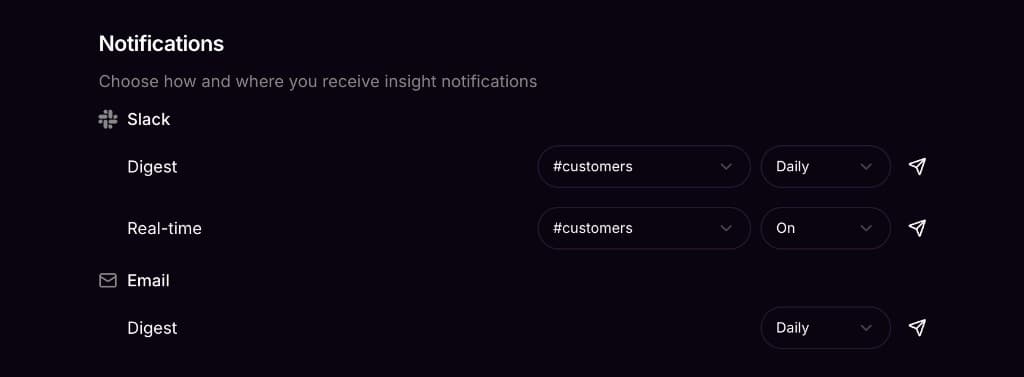
You can now configure real-time alerts to watch for specific events. When a customer triggers one of those events, Klime posts to your Slack channel instantly with the customer name (linked to their dashboard page) and event details.
Perfect for catching signups, upgrades, or any event worth celebrating or investigating right away.
You can now sign in with Google or create an account with email and password.
Previously, Klime only supported Slack authentication. Why? Good question. Now you have more options to access your account the way you prefer.
Team management also got an upgrade. Invite teammates by email and they can join using any authentication method.
Don't use Slack? You can now receive your daily digest via email.
The email digest includes the same customer health insights, activity charts, and analysis as the Slack version. Delivered straight to your inbox each morning.
Configure your digest preferences in Settings to choose between Slack, email, or both.
The Slack daily digest got a major upgrade.
Your morning digest now includes:
The digest now gives you a complete picture of customer health trends, not just yesterday's snapshot.
Klime now understands Slack threads.
When you ask follow-up questions in a thread, Klime remembers the context from earlier in the conversation. No need to repeat yourself, just keep the discussion going naturally.
Messages sent from Slack also now show a Slack badge in the web dashboard, so you can see where each conversation started.
Press CMD+K (or Ctrl+K) anywhere in the dashboard to instantly search for customers.
Jump directly to any customer's detail page without navigating through lists. The search matches on customer names and lets you quickly find who you're looking for.
Klime now supports User Mode for B2C products alongside the existing Group Mode for B2B.
When you set up Klime, you can now choose:
The entire dashboard, AI chat, and daily digests adapt to your chosen mode. User Mode customers see individual user health scores, activity timelines, and churn predictions instead of company-level metrics.
Track which features your customers are actually using with our new feature adoption analytics.
The dashboard now shows adoption rates across your customer base, helping you understand which features drive engagement and which might need attention. You can also see feature usage breakdowns on individual customer and user detail pages.
Your Slack daily digest now includes new customers and returning customers alongside your at-risk alerts.
This gives you a complete picture of customer activity each morning: who's churning, who's new, and who came back after being inactive.
You can now see at a glance whether Klime is receiving events from your product.
A new status indicator in the dashboard shows your data collection health. Click it to see details about when we last received events and troubleshoot any issues with your SDK integration.
Klime helps you retain customers by alerting you before they churn, explaining why with AI, and drafting the perfect outreach to keep them engaged.
We're just getting started. Follow along here as we ship.